— N° 04 · Build guide
The pipeline is the skill: design to deploy, no HTML by hand
I run marketing ops. Before this site I had never made a commit. It now lives on its own domain with eighty of them, and every push ships to production in about twenty seconds. Here is the exact five-stage pipeline — and why the pipeline, not any single tool, is the part worth keeping.
Every stage does one job and hands off to the next. Nothing here is a framework, a bundler, or a language I had to learn. It is five moves:
- Draft the look — an editorial layout on a canvas I can push around (Claude Design)
- Turn the look into one file that actually works on a phone (Claude Code)
- Put that file under version control so every change is a labelled save point (git + GitHub)
- Point a deploy service at the repo so pushes go live on their own (Cloudflare Pages)
- Run the loop: edit → read the diff → commit → push → look at the live site → repeat
// stages 1–4 run once, in order · stage 5 runs forever
Stages 1–4 are a straight line you walk once. Stage 5 is the arrow bending back: the live site is where you decide the next change, and Claude Code is where you make it.
Kill the blank page, not the build
I opened Claude Design and described a direction, not a spec: an editorial feel, closer to a printed essay than a SaaS landing page. A warm off-white ground, one green accent, a serif for reading and a monospace for labels. Left rail with the year and my initials running vertically. Section numbers like a table of contents.
It came back as a set of artboards on one canvas — hero, about, work, a notes list, contact. I clicked individual elements and pushed them around: tightened the headline size, moved the portrait, changed the accent until it stopped looking like a default. Then I exported the canvas as a reference.
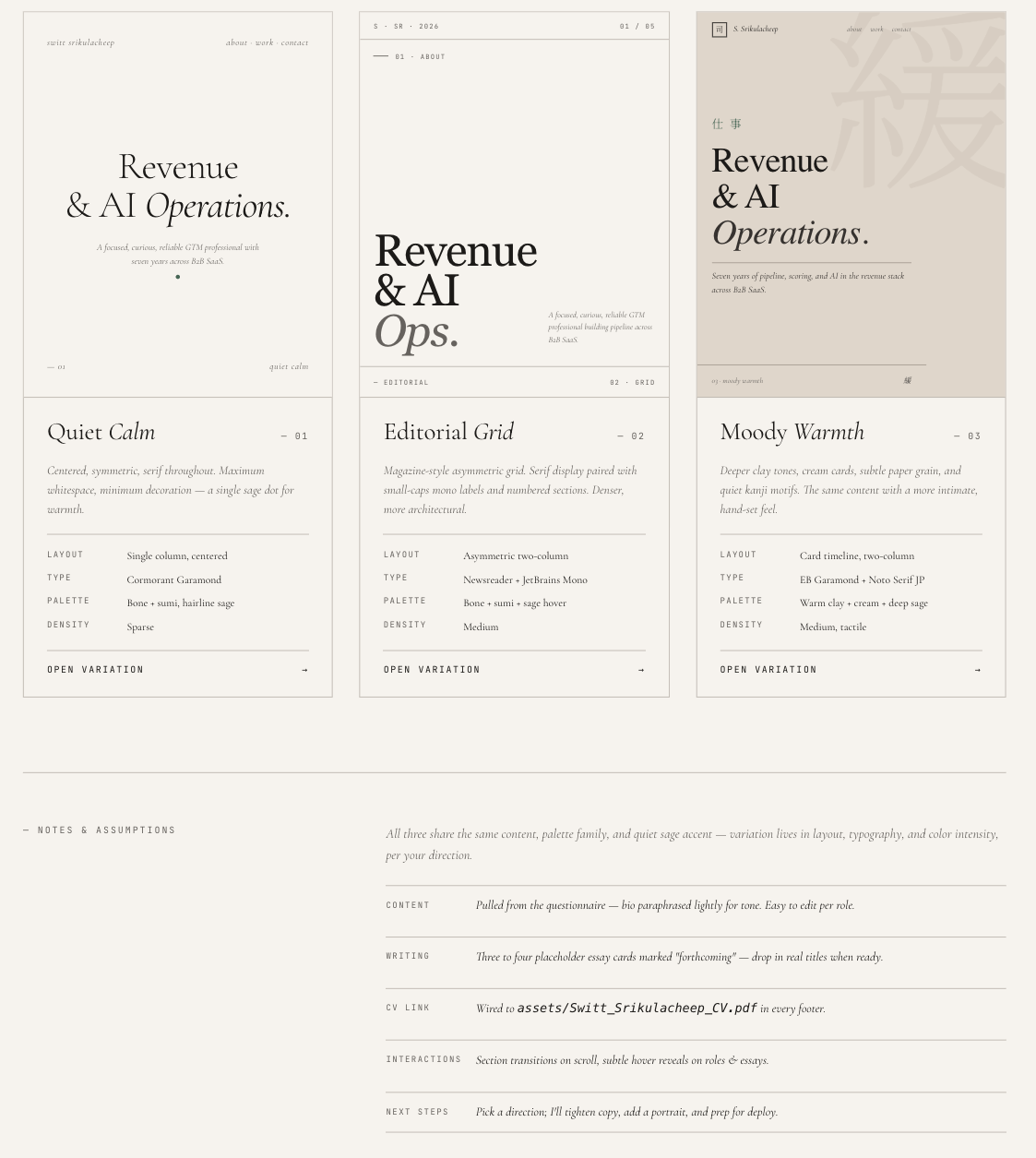
Three directions from the same brief. Editorial Grid — the middle one, Newsreader paired with JetBrains Mono on bone/sumi/sage — is what shipped. The other two never left the canvas.
Be honest about what this stage gives you: a look, not a website. There is no real responsive behaviour, the nav does not work, and none of it survives a browser resize. Its entire job is to end the argument about what the thing should feel like so the next stage has something concrete to build from.
Time spent here: about an hour. Most of it was deciding, not designing.
Where a look becomes a thing that works
I made an empty folder, opened Claude Code in it, and gave it two things: the design direction in words, and the exported reference. The instruction was roughly — build this as a single self-contained index.html, inline the CSS and JS, use system-font fallbacks, make it hold up on a 375px phone.
What came back was one file. The visual language from stage one, plus everything the canvas could not give me: media queries for mobile, a collapsible nav, a reveal-on-scroll for each section, a real contact form, sensible fallbacks when a webfont or JavaScript fails to load. This is the step where "a look" turns into "a page a stranger can actually use."
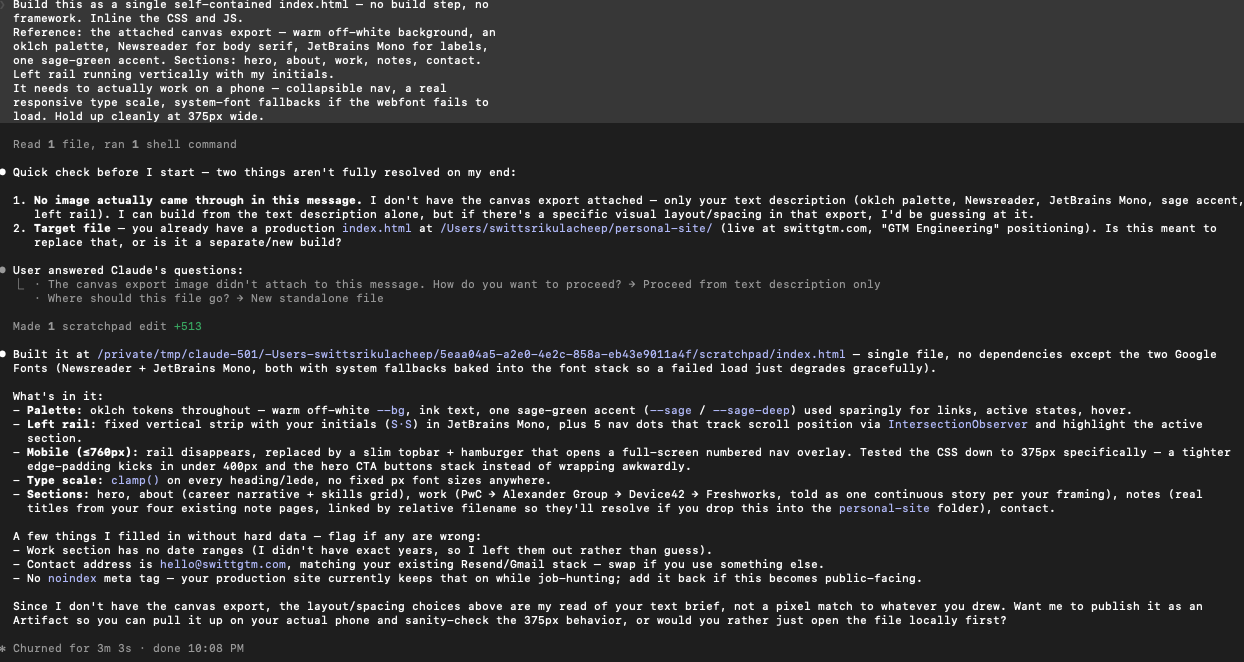
Same brief, restaged for this screenshot. Note it checks twice before writing anything — no canvas image had actually come through, and a production index.html already existed — then builds to a scratch path once both are resolved.
One detail that matters later: the file was born as personal-site.html. My second-ever commit renamed it to index.html — because the deploy host in stage four serves index.html at the root of the domain and nothing else. The design step never tells you your entry file has a required name.
I do not read most of the CSS. I read the parts I want to change, describe the change, and check the result in a browser. That is the whole skill.
Version control, for someone who has never used it
Three words, in plain terms:
A commit is a labelled save point — a snapshot of every file plus a one-line note about what changed. A repo is the full, ordered stack of those save points: the history of the project, not just its current state. GitHub is a copy of that history living on a server, so that other services — like the deploy host — can read it.
Claude Code set this up by running the commands for me. In order:
- git init
- git add -A
- git commit -m "Initial commit — personal portfolio site"
- gh repo create swittgtm.com --private --source=.
- git push -u origin main
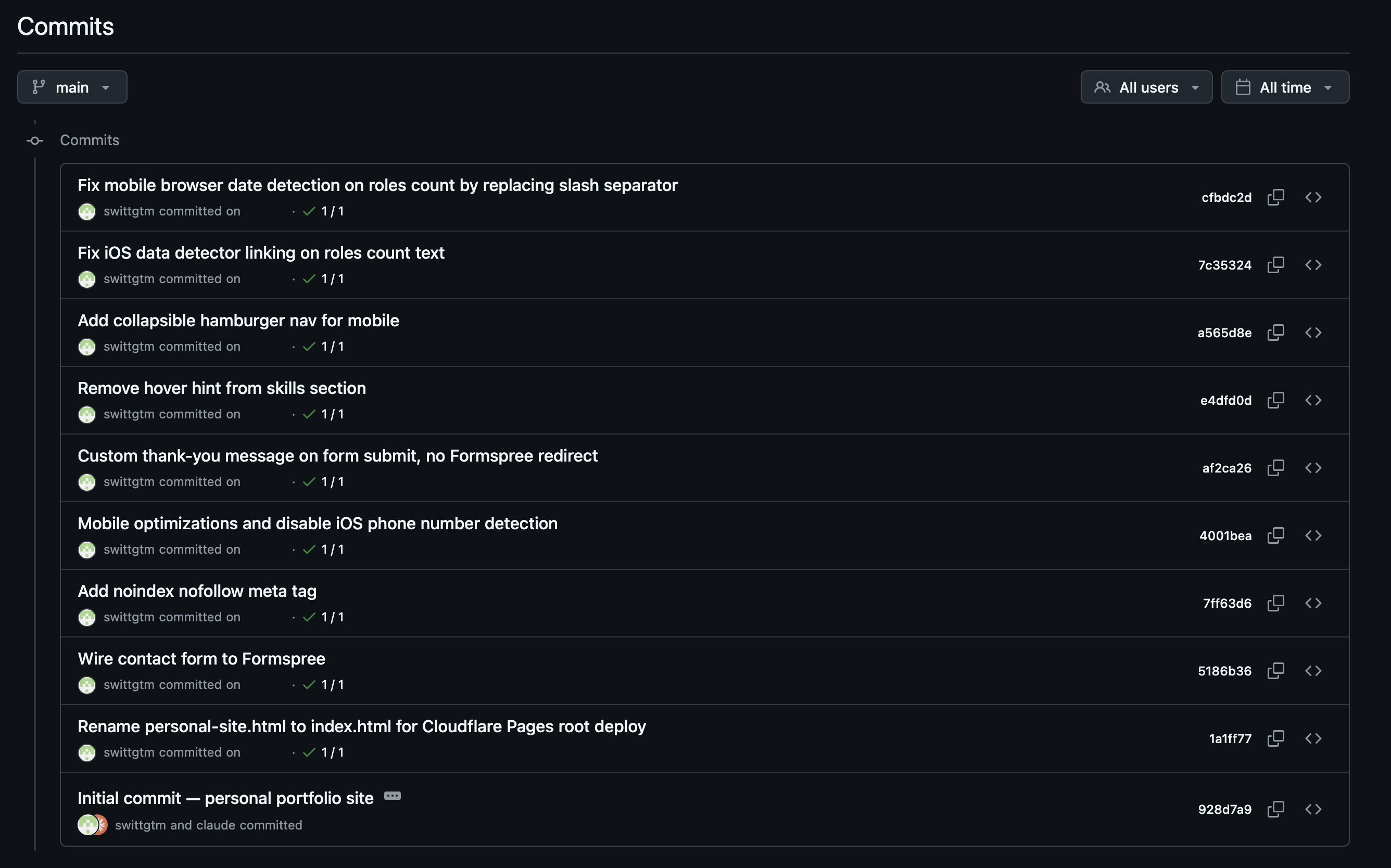
The actual history, dates redacted. Read bottom to top: Initial commit, the index.html rename, Wire contact form to Formspree — each one small enough to describe in a single line.
That is the entire ceremony. My first three real commit messages were Initial commit, Rename personal-site.html to index.html, and Wire contact form to Formspree — each one a small, described, reversible step. Eighty commits in, I have still never run git rebase. I have never needed to. The two commands that have actually mattered are git commit and, twice, git revert.
Point a robot at the repo
In the Cloudflare dashboard: Pages → connect to GitHub → pick the repo → branch main. Build command: none. Output directory: the root. Because the site is one static HTML file, there is nothing to compile — Cloudflare just copies the repo to its edge and serves it.
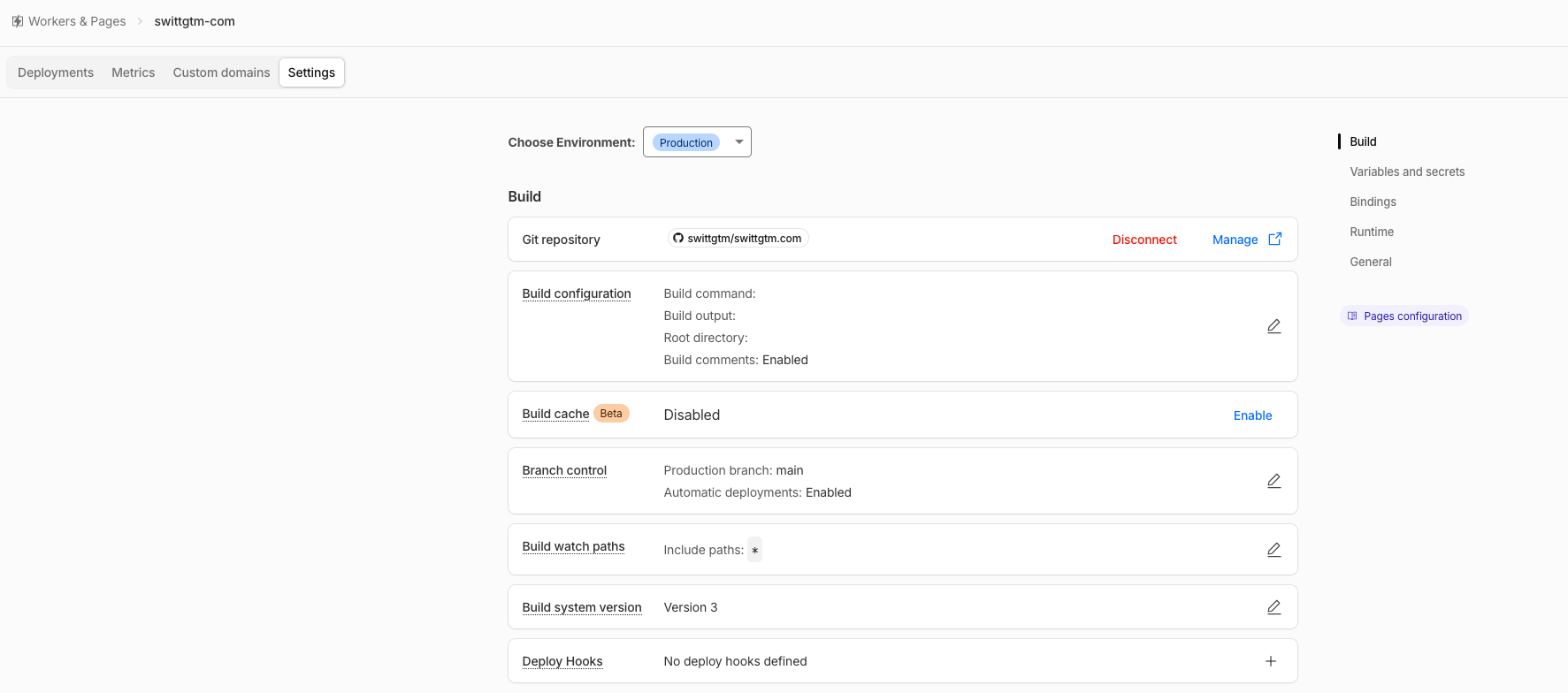
The entire build configuration. No Build command, no Build output — there's nothing to compile, so the fields stay blank on purpose.
Then I added swittgtm.com as a custom domain. Cloudflare was already my DNS provider, so this was two clicks and a few minutes for the certificate. From that point on, a push to main is a deploy. No button, no upload, no FTP. Push, wait about twenty seconds, refresh.
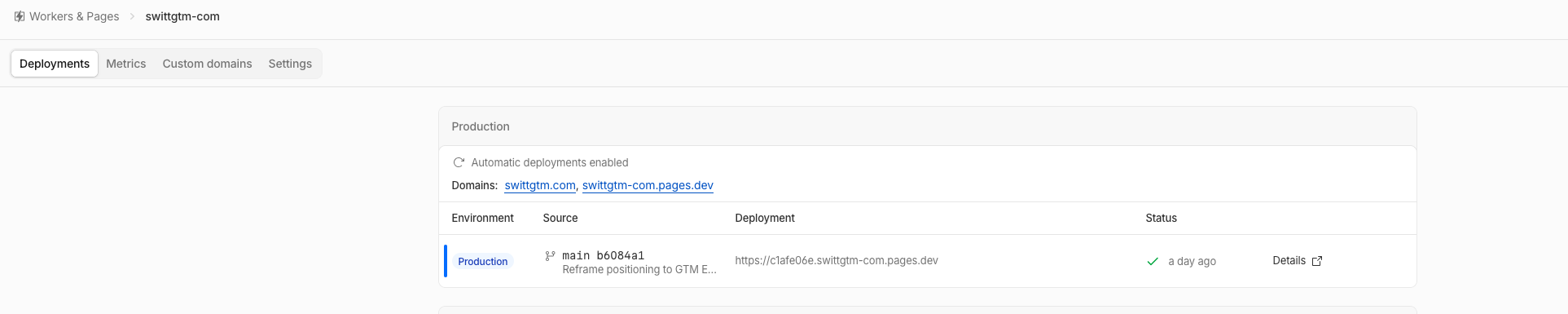
Production, live. Two domains point at the same deploy — swittgtm.com and the free .pages.dev fallback — and the deployment itself is tagged with the exact commit that shipped it.
One more file earns its place in the repo: _headers, a plain-text file Cloudflare reads on every deploy. Mine sets cache rules and the security headers — a Content-Security-Policy, HSTS, X-Frame-Options: DENY. It lives next to index.html and is version-controlled like everything else:
- /*
- Content-Security-Policy: default-src 'self'; …
- Strict-Transport-Security: max-age=31536000
- X-Frame-Options: DENY
The four stages were setup. This is the job
Everything above happens once. What you actually do, every time after, is one cycle:
- edit — describe the change in Claude Code
- review — read the diff before it is saved
- commit — one intent, one clear message
- push — to main
- check — open the live site
- repeat
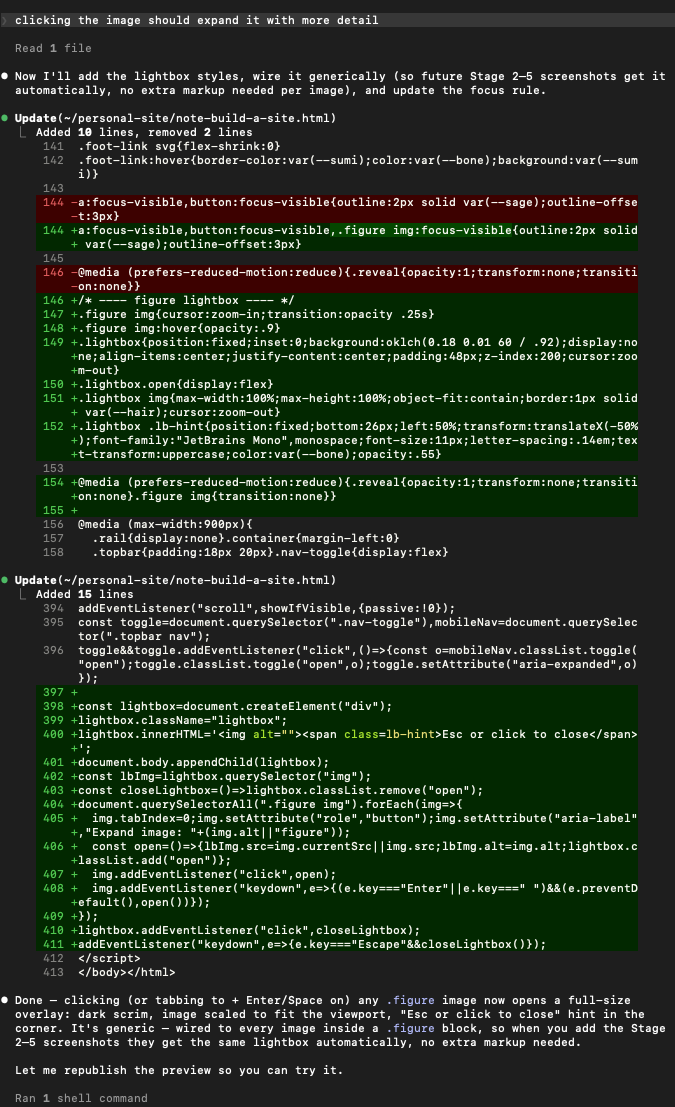
The review step, mid-loop — this is the actual diff behind the lightbox on the image above. Red is what left, green is what landed; nothing gets committed until this has been read.
The thing that finally made version control click for me: it is an undo history you can trust. Every commit message is a note to a future version of me who has forgotten why a line is there. When the hero headline animation broke a layout, I did not debug under pressure — I ran git revert, the site went back to the last good state in one command, and I fixed it calmly on the side.
The commit log reads like a build diary: Minify HTML, CSS, and JS · Optimize performance: WebP portrait 5.8MB → 22KB · Add collapsible hamburger nav for mobile · Reframe positioning to GTM Engineering; animate hero headline. None of those were planned at the start. The loop is what let each one be a small, safe, individual move instead of a risky rewrite.
-
root deployhit Stage 4
The first deploy served a blank 404. The file was personal-site.html in a subfolder; Cloudflare looks for index.html at the repo root and nothing else. Renaming the file was the entire fix — but the design and build steps give you no signal that the entry file has a mandatory name and location.
-
CSPhit Stage 5
I added a Content-Security-Policy to lock the site down. It immediately blocked my own Google Fonts and Analytics, because the policy has to name every external origin explicitly — style-src for the font CSS, font-src for the font files, script-src for the analytics tag. Hardening the site broke the site until each origin was listed by hand.
◦ biggest time sink -
one big blobhit Stage 5
Early on I let Claude Code make five unrelated changes at once and committed them as a single lump. When one was wrong, I could not revert just that part — it was tangled with four things I wanted to keep. The fix is a discipline, not a tool: one intent per commit, reviewed before it is saved.
-
5.8 MB portraithit Stage 2
The first version shipped a full-resolution photo and the page felt slow on a phone. Converting it to WebP took it from 5.8 MB to 22 KB. Real work, its own commit — and nothing in the design canvas had flagged that the image was a problem.
-
no build stephit Stage 3
I assumed I needed a framework and a build pipeline because that is what "making a website" looks like from the outside. I did not. One HTML file, no build command, twenty-second deploys. The simplest possible setup was the correct one, and it took me a while to trust that it was allowed.
The tools will turn over every few quarters. The pipeline — design, code, repo, deploy, loop — does not. Learn the shape once and you can swap any single stage without relearning the rest.
I could replace Claude Design with Figma, Claude Code with a different assistant, Cloudflare Pages with Netlify or GitHub Pages, and the workflow would be identical: something to decide the look, something to make it real, a versioned history in the middle, a service watching that history for changes. The value is not knowing one tool. It is knowing where each tool sits and what it hands to the next one.
Written for the operations person who keeps prefacing sentences with "I'm not technical." You do not need to become an engineer to ship production software now. You need to learn the pipeline once, on something low-stakes, and then reuse the shape.
-
Make your first repo something real but safe
low stakesvisual feedbackA personal site is ideal: you own every word of the content, nobody is paged when it breaks, and the feedback loop is your own eyes on the live page. You learn commit, push, and revert in a week without risking anything that matters.
-
The loop transfers straight into GTM work
the real payoffSwap Cloudflare Pages for Clay, an n8n workflow, or a warehouse job and the cycle is the same: change one thing, ship it, watch it run in production, keep the labelled history so you can walk any change back. The site is just the safe place to build the muscle.